
You have installed the platform, the account is funded, and gold is not in the list. So the first question is the practical one, how to add xauusd in mt5, and it has a short answer that takes about fifteen seconds.
The second question is the one that actually matters, and almost nobody asks it. Having made the symbol appear, what exactly have you added? Because the answer is set by your broker rather than by any standard, and getting it wrong is one of the more expensive ways a new gold account ends.
This article does both. The fifteen seconds first, then the screen you should read before you place a single order on it.
How to Add XAUUSD in MT5, the Short Version
MetaTrader 5 does not show every instrument your broker offers. It shows a working subset in the Market Watch window, and gold is frequently not in the default list.
The route is documented in the platform’s own Market Watch help page. Open Market Watch, then open the symbol manager, which the documentation describes as the command to Open the window for managing symbols with the command Symbols of the context menu
. That gives you the full list of what your broker actually offers rather than what is currently displayed.
In that window, the documentation notes that you can use the filter at the top of the window. Type the first letters of the symbol name or description in it.
Type gold, or type XAU. Then, as the help puts it, Double-click on a symbol name
to toggle it into the Market Watch list, or use the Show button.
Gold now appears in Market Watch and you can open a chart from it. That is the whole of the mechanical answer.
One detail worth knowing while you are in there, from the same page: If there are open positions or pending orders for the financial instrument, or when its chart is open, the instrument cannot be hidden.
If a symbol refuses to disappear later, that is why, and it is not a fault.
Why Gold Was Missing, and Why It Might Be Called Something Else
Three ordinary reasons cover almost every case.
The first is simply that the default list is short. Brokers ship a small Market Watch so the window is usable, and the full catalogue sits behind the symbol manager. Nothing is wrong.
The second is naming. There is no rule that gold must be called XAUUSD. Depending on the firm you may find GOLD, or XAUUSD with a suffix attached, and the suffix is the part to pay attention to. This is why searching the description rather than the exact ticker is the more reliable move.
The third is the account type. A demo and a live account at the same firm can carry different instrument sets, and some symbols are restricted by jurisdiction or by account tier. If gold genuinely is not in the symbol manager at all, that is a question for the broker rather than a platform problem.
A fourth possibility is not a problem at all. Outside trading hours the symbol exists but sits still, which people sometimes read as a broken feed. Gold trades nearly around the clock on weekdays and stops at the weekend, so a frozen quote on a Sunday is the market being shut.
The Screen to Read Before You Trade It
Here is where the survival part of this article begins.
Once the symbol is in Market Watch, the same help page describes reading its trading conditions: click Specification in the context menu of the Market Watch window.
That panel states the contract size, the execution mode, the margin requirement and the commission your broker has set for your account.
Read it once, properly, because those values are not standard across the industry. They are settings. Two firms can offer something called XAUUSD where one full lot means different quantities of metal, and the platform will let you trade either of them with identical confidence.
Contract size is the line that matters most, and the next section is entirely about why.
What the Contract Size Does to Your Risk
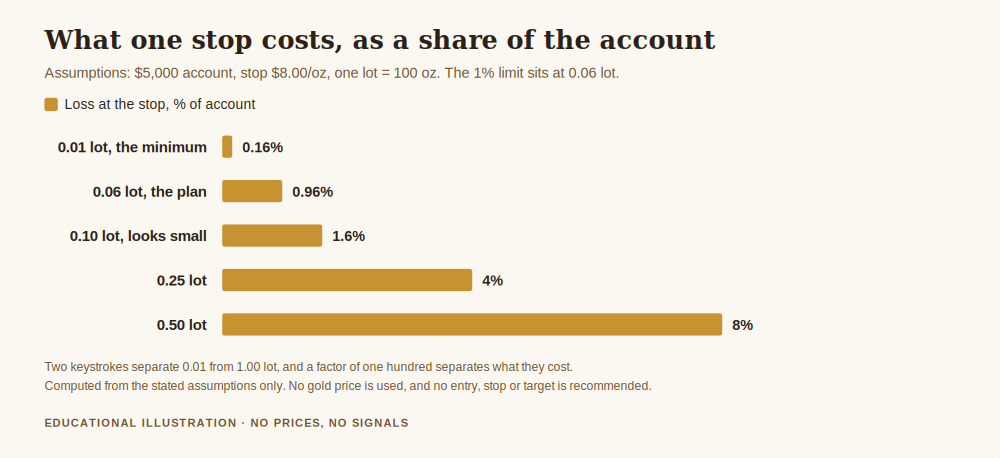
Take the most common retail convention, where one full lot of gold is one hundred ounces. Every figure below is computed from that assumption, and none of them depends on the price of gold.
At 0.01 lot you hold one ounce, so a move of one dollar an ounce is worth one dollar to your account. At 0.10 lot you hold ten ounces and the same move is worth ten dollars. At 1.00 lot you hold one hundred ounces and it is worth one hundred dollars.
The distance between the smallest and largest of those is a factor of one hundred. The distance on screen between them is two keystrokes.
That is the whole hazard, and it explains a category of account failure that looks mysterious from outside. Nobody intends to trade a hundred times their planned size. They copy a lot figure from a tutorial written for a broker whose contract size was different, or they assume the gold contract behaves like the currency pairs they practised on, and the position is wrong before the chart has been considered at all.
Note that this has nothing to do with being right about direction. A correctly analysed trade in the correct direction at a hundred times the intended size is still a serious problem, because the loss you had planned for is now a loss you cannot absorb.
Turning the Specification Into an Order Size
Once you have read the contract size, sizing is arithmetic rather than judgement.
Assume a five thousand account, a limit of one percent of it on any single trade, so fifty, and a stop eight dollars an ounce away from entry. On a one hundred ounce lot convention, one full lot would lose eight hundred at that stop. Fifty divided by eight hundred gives 0.0625 lots.
Round that down, never up, so 0.06 lot. Rounding down leaves you slightly inside your limit. Rounding up puts you outside it, and the habit of rounding up is how a one percent rule quietly becomes something else.
Compare that with clicking 0.10 because it looks like a small, round, harmless number. At 0.10 lot the same stop costs eighty, which is 1.6 percent of the account, or 1.6 times the risk you decided on. That is not a catastrophe on one trade. Repeated across a losing run it is the difference between a drawdown you recover from and one you do not.
Higher leverage does not change any of this. Leverage sets the margin your broker holds, not the money you lose at your stop. The two get confused constantly, and the confusion is expensive. For context on where the limits come from, the ESMA product intervention measures of 27 March 2018 capped retail leverage on gold at 20:1 in that regime and required negative balance protection.
The Suffix Trap
One specific version of this is worth naming, because it catches people who have done everything else right.
Where a broker lists several variants of gold, the variants can differ in contract size, in execution mode, in commission and in minimum size. They are different products wearing nearly the same name.
The failure is undramatic. You read the specification carefully on one variant, size correctly from it, then some weeks later add a chart from a different variant and size it from what you learned the first time. The arithmetic was right. It was applied to the wrong contract.
The defence is to check the specification of the exact symbol on the exact chart you are about to trade, and to keep only the variant you actually use in Market Watch. Hiding the rest is the same double-click that showed them.
Get the free Gold Empire survival sheet, a one-page guide to sizing a gold position from the contract specification rather than from a number you copied, including the arithmetic used on this page. One email, no spam, unsubscribe anytime.
Frequently Asked Questions
How to add xauusd in mt5 in one sentence?
Open Market Watch, open the Symbols window from the context menu, filter for gold or XAU, then double-click the symbol to show it in the list.
I cannot find XAUUSD anywhere in the symbol list.
Search for the description rather than the ticker, because your broker may list gold under a different name. If nothing appears at all, the instrument may not be offered on your account type or in your jurisdiction, and that is a question for the broker.
Why does the price never move after I add it?
Most often the market is closed, which on gold means the weekend. If quotes stay frozen during normal weekday hours, check the connection status and then the symbol’s trading sessions in its specification.
Does MT5 work the same way as MT4 for this?
The idea is the same, a symbol list you can add to, but the windows and menus differ, so instructions written for the older platform will not match exactly. The specification habit described here matters equally on both.
Is 0.01 lot always one ounce of gold?
No, and this is exactly the assumption to avoid. One ounce at 0.01 lot follows from a one hundred ounce contract, which is common but is a broker setting rather than a rule. Read the contract size on the specification screen for the symbol you are about to trade.
Where did the numbers in this article come from?
The platform instructions are quoted from the MetaTrader 5 Market Watch help page linked above, and the leverage cap and negative balance protection from the ESMA measures also linked above, both checked live before publication. Every other figure is computed from the stated assumptions, a one hundred ounce lot convention, a five thousand account, a one percent risk limit and an eight dollar an ounce stop. None of them depends on the price of gold.
Gold Empire is free to follow. Daily XAUUSD analysis with the reasoning stated before the trade rather than after it, on Telegram, and a free survival sheet for anyone who wants the capital protection material in one place. There is an optional Kit for people who want the whole method. No profit promises, and nothing here is a signal service.
If you want the rest of this thread: risk management in gold trading is the pillar this article sits under, how to add gold to MetaTrader 4 covers the same job on the older platform, and how to calculate lot size for gold turns the contract size into an order you can actually place. More about who writes this is on the author page.
About the author. Matthew writes Gold Empire. He spends most of his time on the unglamorous half of this business, the part concerned with still being here next year, and he has never met an account that was lost because the platform was hard to configure, only ones lost because nobody read what they had configured. Nothing in this article is a recommendation to trade, and no entry, stop or target discussed should be treated as a signal.
Disclaimer: This article is general educational content about platform configuration, contract specifications and position sizing in retail gold trading. It is not financial advice, not investment advice and not a recommendation to buy, sell or use any product, venue or firm. Platform behaviour and instrument settings vary by broker and may change, and regulatory wording is quoted from the source linked in the text. Trading leveraged products carries a substantial risk of loss and most retail accounts lose money. All figures are illustrative calculations from the stated assumptions, not predictions, and not claims about any past or future performance.
One step first
Where should we send the Gold Survival Sheet?
Leave your email and we will send the free one page checklist, then take you straight to the Telegram channel.
No cost and no obligation. Educational only, not financial advice, and nothing here promises a return. Unsubscribe any time in one click.
Leave a Reply