
How to add gold to MetaTrader 4 is a question with a fifteen second answer and a much longer consequence. The fifteen seconds are worth having, so I will give them to you first and then explain why the second half of this article exists at all. The short version: gold is usually hidden rather than missing, and it lives in a folder you have to open on purpose.
The longer version is the one that costs people money. Once the symbol is on your screen, there is a single line in its contract specification that decides how much of your account is at stake every time you type a number into the volume box. Two brokers can both hand you something called GOLD and mean quantities that differ by a factor of a hundred. Nobody warns you, because from the platform’s point of view nothing is wrong. You asked for one lot and you got one lot.
How to Add Gold to MetaTrader 4 in Under a Minute
Gold is not on the default watchlist for most accounts, which is why it looks absent. It is not. Here is where it is hiding.
Find the Market Watch panel, the list of instruments with bid and ask prices, usually down the left side. If it is not visible, open it from the View menu. Right click anywhere inside that list and choose Symbols. You will get a window with folders in it, and gold will be inside one called Metals, Spot Metals, Commodities or something similar depending on your broker. Open the folder, find the gold line, and either double click it or select it and press Show. It appears in Market Watch and you can now open a chart from it.
MetaTrader 5 works the same way with one extra convenience: there is a plus button underneath the Market Watch list, and MetaQuotes describes the behaviour as typing “the name of the symbol” after which “the list of suitable symbols is shown”. The official Market Watch documentation is worth two minutes of your time, and the equivalent MetaTrader 4 help covers the older interface.
If the folder is there but gold is not in it, that is not a display problem. It means the account type you opened does not carry metals, and no amount of clicking will add them. That is a conversation with your broker, and it is a fast one.
Why It Is Almost Never Called “Gold”
The symbol you are looking for is most often XAUUSD. XAU is the standard code for one troy ounce of gold, so XAUUSD reads as the price of gold in dollars, exactly like EURUSD reads as the price of euros in dollars. Some brokers do label it GOLD. Others use both, for different products.
Then there are the suffixes, and these matter more than they look. You will see things like XAUUSD.m, XAUUSDmicro, XAUUSD.c, GOLDmini, or the same name with a dot and two letters after it. A suffix is not decoration. It is usually the broker telling you which contract you are about to trade, and different suffixes on the same underlying metal can carry different contract sizes, different minimum volumes and different margin requirements.
This is also why a symbol that worked on your demo may not exist on your live account, or may exist under a different name with a different size behind it. The demo and the live server are different servers with different symbol lists.
The One Line in the Contract Specification That Decides Everything
Before you place a single order, right click the symbol and open Specification. MetaQuotes describes this window as showing “the symbol trading conditions (contract specification)”, and it lists spread, margin, execution type and, the line that matters here, contract size.
Contract size tells you how many ounces one lot represents. The common conventions are 100 ounces for a standard contract, 10 for a mini and 1 for a micro. Read that again, because the ratio between them is 100 to 10 to 1. The same ticket, the same typed volume of 1.00, means a hundred times more metal on the first than on the last.
The platform will not stop you. The order dialog does show you the resulting position value before you confirm, which is the number people scroll past. So let me make the case for not scrolling past it, in percentages rather than in dollars, so that it applies to your account whatever size it is.
What One Ordinary Day Actually Does
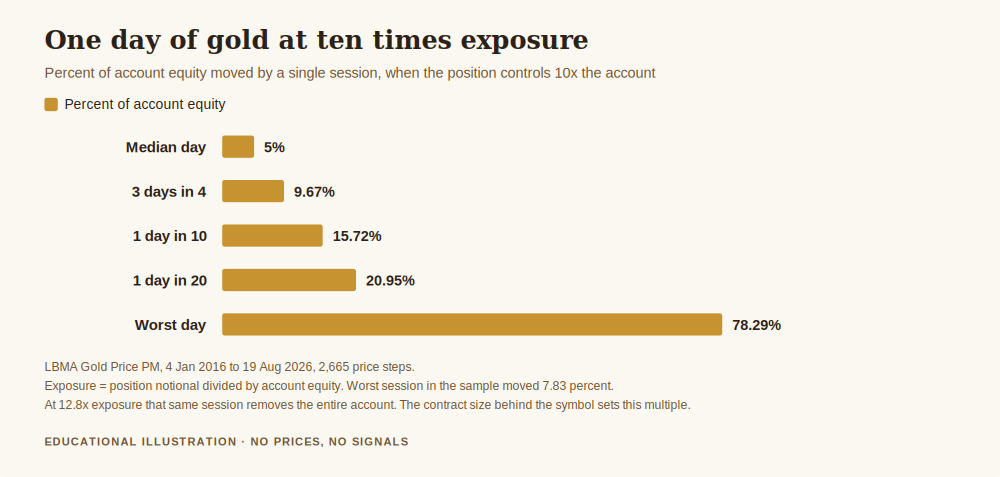
I took the London afternoon gold benchmark published by the LBMA, 2,666 sessions from 4 January 2016 to 19 August 2026, and measured every day to day move. Half of all sessions moved 0.4997% or less. One session in four moved more than 0.9671%. One in ten moved more than 1.5719%. One in twenty moved more than 2.0948%. The largest single session in the whole sample moved 7.8289%, on 30 January 2026, and it was a fall.
Those look like small numbers because gold is not a volatile asset by percentage. The exposure multiple is what turns them into something else. Define that multiple as the notional value of your position divided by your account equity, and call it E. An E of 10 means you are controlling ten times the money you have. A day that moves gold by d percent moves your account by E times d percent, and here is what that produces at E of 10:
- A median day: 5.00% of the account.
- Three days in four are under: 9.67%.
- One day in ten exceeds: 15.72%.
- One day in twenty exceeds: 20.95%.
- The worst day in the sample: 78.29%.
Two reference points are worth memorising. At an E of 2.00, a median day is worth about 1% of your account, which is roughly what most risk frameworks would call a normal day. And at an E of 12.8, the worst session in this ten year sample takes the entire account. Not a margin call, not a scare. All of it.
Frequency matters as much as magnitude. Walking the same series forward, an account running at E of 20 had a session costing 10% or more of equity in 22.81% of all sessions, with a median wait of just 3 sessions before the first one arrived. At E of 50, 2.96% of sessions were large enough to cost 100% of the account.
The Mistake That Multiplies Everything by One Hundred
Now put the two halves together, because this is the specific accident this article exists to prevent.
Suppose you sized a position sensibly for a micro contract, one ounce per lot, and arrived at an exposure multiple of 1. Modest. Defensible. Then suppose you traded that same volume on the standard symbol, one hundred ounces per lot, because the names looked alike and you did not open Specification.
Your E is no longer 1. It is 100. A median day, the sort of day nobody remembers, now moves 49.97% of your account. The worst day in the sample would have moved 782.89% of it, which is simply a way of saying the account ended long before the day did, and on an account without negative balance protection the loss does not stop politely at zero.
The error is not in your analysis, your entry or your discipline. It is in a dropdown. That is what makes it worth thirty seconds of prevention.
Get the free Gold Empire survival sheet, a one page guide to the account habits that decide whether a bad month is survivable, including the contract size check this article argues for. One email, no spam, unsubscribe anytime.
The Thirty Second Check, Every Time You Change Broker
This is the whole habit, and it is short enough to actually do.
Open Specification and read the contract size. Write it down. Then open the order dialog, type the volume you intend, and read the position value it shows you before confirming. Divide that value by your account equity. That is your E. If it is a number you would not say out loud to someone whose opinion you respect, change the volume, not the plan.
Do this again on every new account, every new broker and every symbol with a suffix you have not traded before. The check is not clever. It is just the one thing that stands between a correct idea and a hundredfold error, and it costs less time than reading this paragraph did.
What This Does Not Say
It does not say small contracts are safer. A micro contract traded at fifty lots is the same exposure as a standard contract traded at half a lot. The contract size is not the risk. The contract size multiplied by your volume, divided by your equity, is the risk, and only the last of those three is fully under your control.
It does not say the worst day will repeat. The 7.8289% session is one observation from one decade, and a single daily benchmark understates what happens inside a day, so the real intraday extremes were worse than anything quoted here.
It does not recommend any exposure multiple. There is no number in this article you should copy. The point is that you should know what yours is, and most people who blow accounts could not have told you.
And nothing here is a view on the price of gold. There is no price level anywhere in this article, deliberately. Everything is expressed as a percentage so that it stays true whatever the market is doing when you read it.
Frequently Asked Questions
Why can I not find gold in MetaTrader 4 at all?
Most often it is hidden rather than absent: right click in Market Watch, choose Symbols, and open the Metals or Commodities folder. If it genuinely is not listed there, your account type does not carry metals and only your broker can change that.
What is the difference between XAUUSD and GOLD?
Usually nothing but the label, since both refer to spot gold priced in dollars. Occasionally a broker uses the two names for products with different contract sizes, which is exactly why the answer comes from the Specification window rather than from the name.
What do the suffixes like .m or micro mean?
They generally identify the contract variant, and different variants can carry different contract sizes, minimum volumes and margin requirements. Treat a suffix you have not seen before as an unknown instrument until you have read its specification.
How to add gold to MetaTrader 4 on a phone?
The mobile apps use the same symbol list: open Quotes, press the plus icon, and browse to the Metals group. The contract size is still worth checking, and it is easier to misread on a small screen, which is an argument for doing the check on a desktop first.
Why does one lot cost so much more on my new broker?
Almost always because the contract size differs from your old one. Compare the two Specification windows side by side before you assume anything about margin or leverage has changed.
Where Gold Empire Fits
Gold Empire is free to follow. Daily gold analysis with the reasoning attached, losing days included, plus an optional Kit for people who want the method written down. Nothing here promises a profit and nothing here ever will.
Survival first, as always. The exposure multiple in this article is the same quantity approached from the platform side, and how to calculate lot size for gold forex is where the arithmetic gets done properly. What is leverage in gold trading explains the mechanism that makes E larger than 1 in the first place, and risk management in gold trading is the piece that ties size, frequency and survival together. If you are still choosing where to open an account, how to open a gold trading account and the best broker for gold trading cover what to ask before you sign up, and contract size belongs on that list of questions.
About the author. Matthew writes Gold Empire. He is interested in the unglamorous half of this business, cost, size, frequency and the arithmetic of staying solvent, on the view that most accounts are lost to ordinary errors repeated patiently rather than to one dramatic mistake.
Disclaimer: This article is general educational content about trading platform setup and position sizing arithmetic. It is not financial advice, not a recommendation of any broker, platform or account type, and not a suggestion to open any particular position. Trading gold, CFDs and leveraged products carries a high risk of losing money rapidly. No entry, stop or target discussed should be treated as a signal. Platform behaviour is described from the publicly published MetaTrader 5 Market Watch documentation and MetaTrader 4 help published by MetaQuotes; menu names, symbol names, suffixes, contract sizes and folder labels are set by each individual broker and will differ, so your own Specification window is the authority and not this article. Contract sizes of 100, 10 and 1 ounces are the common market conventions and are used here as illustrative examples, not as a statement about any particular broker’s products. All market figures were computed by me from the published LBMA gold benchmark, afternoon fix, across the 2,665 price steps between 2,666 published sessions from 4 January 2016 to 19 August 2026, using published benchmark values only. Because the sample contains one observation per business day, intraday extremes are understated and the real worst case within a session was larger than any figure quoted here. Position outcomes are treated as linear in the underlying move, ignoring spread, commission, financing and slippage, each of which makes a real result worse rather than better. The exposure multiples shown are illustrations of arithmetic and are not recommendations of any position size. No gold price level is quoted anywhere in this article and no trading results are represented. Past behaviour of a public benchmark is not a prediction.
One step first
Where should we send the Gold Survival Sheet?
Leave your email and we will send the free one page checklist, then take you straight to the Telegram channel.
No cost and no obligation. Educational only, not financial advice, and nothing here promises a return. Unsubscribe any time in one click.
Leave a Reply