

There is a version of this question that the manuals answer in four lines, and a version that costs people real money. The first is mechanical: which button, which box, which number. The second is the one nobody warns you about, and it is why how to sell gold on metatrader 5 is worth more than four lines of explanation.
Here is the short version, so nobody has to read three thousand words to place a trade. Open the Market Watch, find your gold symbol, press New Order, set the volume, press Sell by Market. That is the whole mechanical answer, and if that is all you came for, you can stop reading.
The part worth staying for is this. On MetaTrader 5, pressing Sell while you already hold a buy position does not always do what you think it does. On some accounts it closes your position. On other accounts it opens a second one, in the opposite direction, and leaves the first exactly where it was. Same platform, same button, opposite outcome, and which one you get was decided by your broker before you ever logged in.
How to Sell Gold on MetaTrader 5, the Mechanical Part
Assuming the symbol is already in your Market Watch, and if it is not then adding XAU/USD in MT5 is the first job, there are three routes to a sell order and they all reach the same place.
- Right-click the symbol in Market Watch and choose New Order. The order window opens with that symbol preselected.
- Press F9 from anywhere in the terminal. Faster, and it uses whichever chart is focused, which is exactly why it is also the way people place orders on the wrong instrument.
- Use the one-click trading panel in the top-left corner of the chart, if your broker has it enabled. Fastest, and the least forgiving, because there is no confirmation step between your finger and the market.
In the order window you set four things. The symbol, which you should read rather than assume. The volume, in lots. The order type, which is Market Execution for an immediate fill and Pending Order if you want it to trigger later at a level. Then you press Sell, which sits on the left and is usually red.
A market sell fills at the bid, and the difference between bid and ask is the spread, which you have now paid. A pending sell comes in two flavours that people confuse constantly: a Sell Limit sits above the current price and triggers if price rises into it, a Sell Stop sits below and triggers if price falls through it. If that distinction is not automatic yet, the buy-side version of the same logic explains the geometry properly.
That is the mechanics, and none of it is the hard part. The hard part is what happens on the second press.
Sell Does Not Mean Close, and That Is Where Accounts Get Hurt
Picture the ordinary sequence. You are long gold. The trade goes against you. You decide to get out. You look at the terminal, you see a Sell button, and selling is obviously the opposite of buying, so you press it.
On some accounts you are now flat, which is what you wanted. On others you are now long and short at the same time, in the same instrument, for the same volume. Your net exposure is zero, so the loss stops growing, which feels like it worked. It did not work. Your original loss is still sitting there, frozen at whatever it was, and you now own two positions instead of none, both of which still cost you money to carry and both of which you will eventually have to close.
Traders call the second outcome a lock, or a hedge. Sometimes it is done deliberately. Far more often it is done by someone who thought Sell meant close, and the difference between those two situations is entirely a matter of whether you knew which kind of account you were on.
Netting or Hedging: Your Broker Already Chose for You
MetaTrader 5 has two position accounting systems, and the official documentation is unusually direct about it. As the MetaTrader 5 trading help puts it, “the system used depends on the account and is set by the broker.” You do not choose it from a menu. You inherit it.
On a netting account, the documentation states that when “a deal is executed in the opposite direction, the volume of the existing position can be decreased, the position can be closed (when the deal volume is equal to the position volume) or reversed (if the volume of the opposite deal is greater than the current position).” So on a netting account, selling the exact volume you are long does close you out. Selling more than that flips you short, which is its own surprise if you were not expecting it.
On a hedging account, the same documentation says that if “you have an open position for a symbol, and execute a new deal (or a pending order triggers), a new position is additionally opened. Your current position does not change.” That is the lock. Your losing trade is untouched, and a second trade now sits beside it.
Most retail forex and gold brokers hand out hedging accounts, because MetaTrader 4 only ever worked that way and the habit carried over. But you cannot rely on a habit for something this consequential. Check it before you need to know: place one small test order in the opposite direction to something you already hold, and watch the Trade tab. If the position vanishes, you are on netting. If a second line appears, you are on hedging. Two minutes, once, and then you know.
What the Accidental Lock Actually Costs
People tolerate the accidental lock because it looks free. The loss stopped moving, nothing was crystallised, no harm apparently done. The harm is real, it is just spread across three separate bills.
The first bill is spread. Closing a position correctly costs you one exit. Locking costs you an extra entry now, on the unwanted second position, and an extra exit later when you finally unwind it. Two extra crossings of the spread, and the size of that bill scales exactly with your position size.
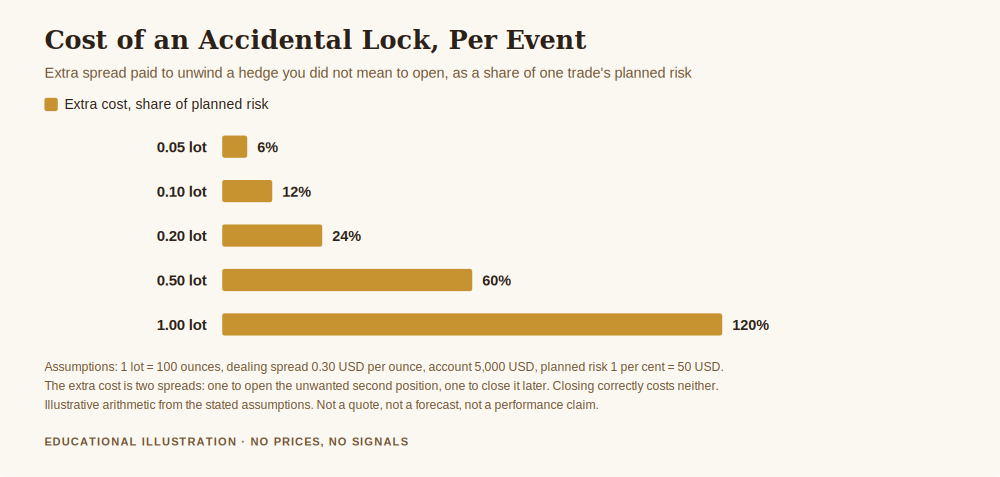
Work it at a dealing spread of 0.30 US dollars per ounce, with the standard contract of 100 ounces to a lot, on a 5,000 dollar account risking one per cent, so 50 dollars, per trade. At 0.20 lot the accidental lock costs 12.00 dollars in extra spread, which is 24.0 per cent of the entire risk budget for that trade. At 1.00 lot it costs 60.00 dollars, which is 120.0 per cent, more than the whole planned risk, spent on nothing but a misunderstanding about a button.
Now make it a habit rather than an accident. Two hundred trades in a year, with this going wrong on one in twenty of them, is ten events. At 0.20 lot that is 120.00 dollars a year, or 2.40 per cent of the account, which is 2.4 full units of risk handed over annually for no exposure and no thesis. Those are illustrative figures from the assumptions just stated, not a forecast, but the structure of the bill does not change when you substitute your own numbers.
The second bill is swap. Both legs of a lock are financed positions, so you pay or receive the overnight charge on each of them, and on most gold accounts the two do not cancel. The net is usually a drip out rather than in, every night, for as long as the lock sits there.
The Margin Arithmetic Nobody Shows You
The third bill is the one that ends accounts, and it is the least obvious, because a locked pair feels safer than a naked position. It is not. It can be strictly more dangerous.
Under the retail rules the European regulator introduced in March 2018, leverage on gold for retail clients is capped at 20 to 1, which means opening margin is 5.00 per cent of the notional value of the position. Those same measures set a margin close-out rule on a per account basis at 50 per cent of required margin, along with negative balance protection and the finding that 74 to 89 per cent of retail accounts typically lose money.
Follow the arithmetic through a lock. One position needs 5.00 per cent of notional in margin, and the close-out rule reaches for you when equity falls to half of that, so 2.50 per cent of notional. Many brokers charge margin on both legs of a locked pair rather than netting them off. If yours does, the requirement becomes 10.00 per cent of notional, exactly twice, and the close-out level rises to 5.00 per cent of notional, also exactly twice.
Read that last sentence again, because it inverts the intuition completely. The position that feels safe, because net exposure is zero, is the position that gets you force-closed at twice the equity level. You have not reduced your risk. You have raised the floor you fall onto, and you did it while believing you had bought yourself time. Some brokers do net the margin on locked pairs, some do not, and the platform’s own margin documentation is the place to start before you assume yours is generous.
How to Close a Gold Position Properly on MT5
Since Sell is not the answer, here is what is.
- In the Toolbox at the bottom of the terminal, open the Trade tab. Every open position is listed there.
- Find the line for your gold position and click the small × on its right-hand edge. That closes the whole position, at market.
- To close part of it, right-click the line, choose Close Position, and set a smaller volume before confirming. Closing 0.05 of a 0.20 lot position leaves you long 0.15, not long 0.20 and short 0.05.
- To close everything at once, right-click anywhere in the Trade tab and use Close All. Read which option you picked, because there are variants that close only profitable positions or only losing ones.
The rule underneath all four is worth stating plainly: to reduce exposure, act on the position, not on the market. The × belongs to the position. The Sell button belongs to the market, and the market is happy to sell you something new at any hour.
The Volume Box Is the Other Way This Goes Wrong
The second recurring accident on MT5 is not the button, it is the number beside it. Volume is in lots, and one lot of gold is 100 ounces, so the gap between 0.10 and 1.00 is not cosmetic. It is ten times the exposure, which turns a planned one per cent risk into ten per cent on a single trade, and a ten per cent hole needs an 11.11 per cent gain to fill.
Two habits fix this permanently. Work out the volume from your risk before the order window is open, which is what calculating lot size for gold and forex is for, and read the volume box out loud before confirming. It looks absurd, and it is the cheapest insurance in the terminal. If you need to adjust a trade rather than close it, modifying an open trade covers that logic, which is nearly identical across MT4 and MT5.
A Short Checklist Before You Press Sell
None of this requires a system. It requires four questions, asked in the two seconds before the click.
- Am I opening a new short, or trying to close something I already hold? If it is the second, the Trade tab is where I should be, not the order window.
- Is this account netting or hedging? If I do not know, I find out before I am under pressure, not during.
- Is the volume box the number I calculated, or a number I typed quickly?
- Is the symbol the one I meant? Gold trades under different tickers at different brokers, and F9 does not care which chart you were looking at.
These are unglamorous questions. They also cover most of the ways a routine exit turns into an expensive afternoon, and none of them requires you to be right about where gold goes next.
Get the free Gold Empire survival sheet, a one-page guide to protecting your account through the kind of market this article describes. One email, no spam, unsubscribe anytime.
Frequently Asked Questions
How to sell gold on MetaTrader 5 if I do not already own any gold?
The same way. A sell here is a contract for difference on the gold price, not a sale of metal, so nothing has to be in your possession first. You are agreeing to settle the difference in price, which is also why the position carries margin and an overnight financing charge rather than a storage cost.
Why did pressing Sell not close my buy position?
Because your account almost certainly uses the hedging accounting system, where a new deal opens an additional position and leaves the existing one untouched. Close positions from the Trade tab in the Toolbox instead, using the × on the position’s own line.
Is locking a position a legitimate strategy?
Some traders use it deliberately, usually to hold exposure through an event without closing. It is not free: you pay an extra spread to open the second leg and another to unwind it, you carry swap on both legs, and if your broker charges margin on both sides, your close-out level moves against you. Doing it on purpose after counting those costs is a decision. Doing it by accident is a bill.
How do I tell whether my account is netting or hedging?
Place one very small order opposite to an existing position and watch the Trade tab. One line means netting, two lines mean hedging. Your broker’s account specification page will also say, and the platform sets it from the server rather than from anything you can change locally.
Does MetaTrader 4 work the same way?
MT4 only ever offered the hedging model, so an opposite order there always opens a second position. MT5 supports both, which is precisely why the assumption people carry over from MT4 is no longer safe.
Where did the figures in this article come from?
The 20 to 1 gold leverage cap, the 50 per cent margin close-out rule and the 74 to 89 per cent retail loss range are quoted from the ESMA measures linked above, checked live before publication. The netting and hedging wording is quoted from the MetaTrader 5 help pages linked above. The cost figures are arithmetic from stated assumptions: a 0.30 dollar per ounce spread, 100 ounces to a lot, a 5,000 dollar account and one per cent risk per trade. None of them is a price quote, a forecast or a performance claim.
Where Gold Empire Fits
Gold Empire is free to follow. Daily XAU/USD analysis on Telegram, with the reasoning stated before the trade rather than after it, losing days included. There is a free survival sheet for anyone who wants the capital protection material in one place, and an optional Kit for people who want the full method. Nothing here promises a profit and nothing here is a signal service.
Knowing your platform is part of risk control rather than separate from it. Risk management for gold trading is the pillar this article sits under, leverage in gold trading explains why the margin arithmetic above bites so hard, and managing a gold trade after you enter covers the decisions that come after the order is filled. More about who writes this is on the about page.
About the author. Matthew writes Gold Empire and spends most of his attention on the boring mechanics that decide whether an account is still open in two years. He has a particular dislike of interfaces that hide a consequential decision behind an obvious-looking button. Nothing in this article is a recommendation to trade, and no entry, stop or target discussed should be treated as a signal.
Disclaimer: This article is general educational content about trading platform mechanics, order handling and margin rules in retail trading. It is not financial advice, not investment advice and not a recommendation to buy, sell or use any product, platform or firm. Platform behaviour and broker terms vary and change, regulatory rules differ by jurisdiction, and the quoted documentation should be checked in its current form. Trading leveraged products carries a substantial risk of loss and most retail accounts lose money. Figures are illustrative calculations from stated assumptions, not predictions or performance claims.
One step first
Where should we send the Gold Survival Sheet?
Leave your email and we will send the free one page checklist, then take you straight to the Telegram channel.
No cost and no obligation. Educational only, not financial advice, and nothing here promises a return. Unsubscribe any time in one click.
Leave a Reply