
There is a button in MetaTrader 4 that has cost more accounts than any indicator ever will. It is not a dramatic button. You right click an open position, choose Modify or Delete Order, and a small window appears with two fields in it. That is the whole feature. And yet how to modify a trade on mt4 is one of those questions where the mechanical answer takes ninety seconds and the important answer takes the rest of this article, because the platform will happily let you do something that quietly doubles what you stand to lose.
So I am going to cover both. First the mechanics, properly, including the two things that go wrong and the error message nobody explains. Then the arithmetic of what each kind of modification actually does to your risk, which is the part that decides whether you are still trading in a year. No gold price appears anywhere in this article, and nothing here is a signal.
How to Modify a Trade on MT4: What the Feature Actually Is
Start with a definition, because the word modify is doing a lot of work and MetaQuotes is precise about it. In their own documentation, managing a trade position consists of opening a position, modifying a position, placing pending orders, modifying or deleting pending orders, and closing a position. And MetaQuotes defines modifying a position as changing the Stop Loss and Take Profit levels attached to the open position.
Read that again, because it is narrower than most people assume. Modifying a position in MT4 changes two things and only two things: where your stop sits and where your target sits. It does not change your entry price, which has already happened. It does not change your lot size, which is fixed at the moment of execution. If you want a different size, you are not modifying, you are closing part of the position or opening another one, and those are different operations with different consequences.
That distinction matters more than it sounds, and I will come back to it, because almost every expensive mistake in this area comes from someone changing the stop when what they actually wanted was a different size.
The mechanical steps
In the Terminal window at the bottom of the platform, on the Trade tab, you will see your open positions. Right click the one you want and choose Modify or Delete Order. You can also double click the Stop Loss or Take Profit cell on that row, which opens the same window.
The order window appears with Type set to Modify Order. You will see two fields, Stop Loss and Take Profit, each with a Copy As button next to it that fills in the current market price so you can adjust from there rather than typing a full number. Enter the levels you want and click the long Modify button in the middle. If the field is greyed out or the button does nothing, that is not a bug, and the next section explains it.
The same window handles pending orders, with one addition: for an order that has not triggered yet you can also change the price at which it triggers and its expiry, because nothing has been executed and everything is still adjustable. The four pending order types, Buy Limit, Buy Stop, Sell Limit and Sell Stop, are all editable in this way until the moment they fill, at which point they become positions and the narrower rules above apply.
The two things that go wrong
The Modify button will not activate. The most common reason is that you have not actually changed anything yet, since MT4 keeps the button inert until the values differ from what is already set. Type a different number and it wakes up.
You get an invalid stops error. This is the one that generates confusion, and it is not your platform misbehaving. Brokers set a minimum distance from the current price inside which a stop or a target may not be placed, and if you try to put your level closer than that, the server rejects the modification. The distance is a broker setting rather than a platform setting, it differs between firms and between instruments, and it can widen during volatile periods precisely when you most want to move something. Which is worth knowing in advance: the ability to place a stop very close to price is not a feature you are guaranteed at the moment you need it.
The Modification That Is Almost Always Fine
Moving a stop in the direction of your entry, tightening it, reduces the money at risk on the position. Nothing about that is dangerous to your account arithmetic. You have decided to accept a worse chance of the trade working in exchange for a smaller loss if it does not, and whether that trade off is wise depends on your plan rather than on the platform.
The specific case worth naming is moving the stop to your entry price, which turns the position into one that can no longer lose money at the broker level, ignoring spread and slippage. It has a name and its own considerations, and I have written about them separately in what a break even stop in gold trading is. The point here is only that it belongs to the safe direction, arithmetically speaking.
Adjusting a Take Profit is similarly unremarkable in risk terms. Whether you should is a question about your method. It cannot increase your loss.
The Modification That Ends Accounts
Now the other direction, and this is the whole reason the article exists.
Price moves against your open position. It approaches your stop. You look at the chart and a reason arrives, fully formed and entirely convincing, that the stop is a little too tight, that the level is about to hold, that a few more points of room is all this needs. So you open Modify Order and drag the stop further away.
Here is what you have just done, in numbers. You sized that position so that hitting the stop would cost you a fixed amount, call it one percent of the account. Your lot size is fixed, and MT4 will not change it in this window. Money at risk equals lot size multiplied by the distance to the stop. Move the stop twice as far away and the lot size does not move to compensate, so the money at risk doubles. The risk multiplies by exactly the factor you widened by.
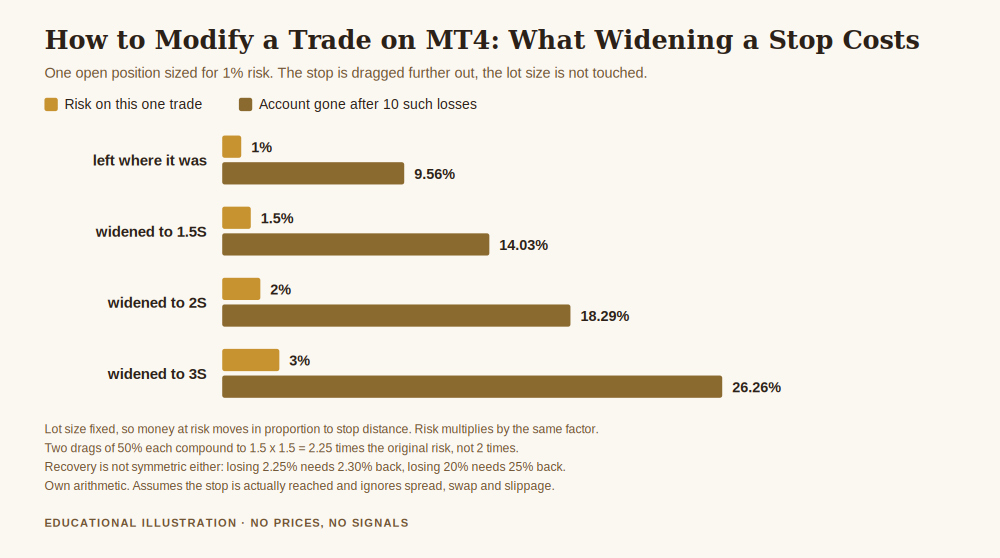
Widen by half and one percent becomes 1.5 percent. Double the distance and it becomes two percent. Triple it and it becomes three percent, three times the loss you agreed to when you had a calm view of the situation.
And it compounds within a single trade, which is the part people miss. Two drags of fifty percent each are not a hundred percent more risk. They multiply: 1.5 times 1.5 is 2.25. You will have taken a one percent risk and turned it into 2.25 percent while feeling, both times, that you were making a small adjustment.
The second bar in that chart is the one worth sitting with. Lose ten trades at the original one percent over a year and you are down to 90.44 percent of the account. Lose ten trades that each became 2.25 percent through this exact habit and you are down to 79.65 percent. Same ten losing trades, same method, same market. The gap is 10.79 percentage points of your capital, and every point of it was created by a button rather than by the market.
Recovery is not symmetric either, which is the quiet part of the arithmetic. Losing 2.25 percent requires 2.30 percent to get back to level, because you are now earning on a smaller base. That gap is trivial at small numbers and brutal at large ones: a 20 percent loss requires 25 percent to recover, and a 50 percent loss requires 100 percent. Every widened stop moves you a little further along that curve.
Why the Reasoning Feels So Convincing
I want to be fair to the impulse, because dismissing it as indiscipline is both rude and useless.
The reason it feels right is that it is occasionally correct. Sometimes price does turn around just past where your stop was, and the trade you widened for goes on to work. That is a genuine outcome and it happens often enough to teach you the wrong lesson very effectively. The problem is not that widening never works. The problem is that it pays out immediately and charges you later, so the feedback arrives in the wrong order for learning anything true.
There is also a structural point. At the moment you are considering the modification, you are the worst informed you have been about this trade all day. You are holding an open loss, which is a poor state for judgement, and you are looking at price rather than at your plan. The version of you who set that stop had none of those handicaps. The modification is not new analysis. It is a proposal to overrule a calmer person using worse information.
The honest test, and it costs nothing: if you were flat right now, with no position and no attachment, would you enter this trade at this price with the stop at the new level? If the answer is no, the modification is not a trading decision. It is a way of not accepting a loss that has already happened.
Get the free Gold Empire survival sheet, a one page guide to protecting your account from the small decisions that quietly enlarge a loss, including a rule for when a stop may and may not be moved. One email, no spam, unsubscribe anytime.
A Rule Worth Writing Down Before You Need It
The useful protection is not willpower, it is deciding the policy while nothing is at stake. Mine is three lines and it fits on a card.
A stop may move toward the entry at any time, and away from it never. Tightening reduces risk and can be done on judgement. Widening increases it and is simply not available, so there is no decision to make in the moment.
If the stop looks wrong, the position was sized wrong. The correct response to a stop that feels too tight is a smaller position with a wider stop, decided before entry. That is a sizing exercise, and it belongs in how to calculate lot size for gold and forex rather than in the Modify window.
Set the stop when you open the trade, not afterwards. MT4 lets you attach both levels in the order window at entry, while you still have no position and no opinion about being right. A stop chosen then is a plan. A stop chosen while an open trade is moving against you is a reaction.
If you want the reasoning behind where the level goes in the first place, where to place a stop loss on XAUUSD covers it, and how to manage a gold trade after you enter covers the legitimate things you can do to a position that is already open, of which widening the stop is not one.
Frequently Asked Questions
How do I modify a trade on MT4 in one line?
Right click the position on the Trade tab of the Terminal window, choose Modify or Delete Order, enter new Stop Loss or Take Profit values, and click Modify. That is the entire feature, and in MetaQuotes’ own terms modifying a position means changing those two levels and nothing else.
Can I change the lot size of an open position?
No. Size is fixed at execution and the Modify window will not touch it. You can close part of the position, which reduces size, or open a separate position, which is a new trade with its own risk. Confusing these with modification is how a stop gets widened when a smaller position was what was needed.
Why does MT4 say invalid stops when I try to modify?
Your broker enforces a minimum distance between the current price and any stop or target, and your level is inside it. It is a server side rule rather than a platform limitation, it varies by firm and instrument, and it can widen when the market is busy. Place the level further away or wait for the constraint to ease.
Is it ever right to widen a stop?
As a general policy for a retail account, no, and the arithmetic is why. Widening does not buy the trade more time for free. It multiplies your risk by the factor you widened by, because the lot size does not change with it. If a wider stop is genuinely correct for the setup, the position should have been smaller from the start.
Does modifying a trade cost anything?
There is no charge for the modification itself. The cost is entirely in what the new levels do to your risk, plus the ordinary costs of the position such as spread and any overnight financing, which continue regardless of where your stop sits.
Where did the numbers in this article come from?
The definition of modifying a position and the pending order types are from MetaQuotes’ own MetaTrader 4 documentation, linked above. Every percentage is my own arithmetic on assumptions stated in the text: a fixed lot size, an initial risk of one percent, and the stop actually being reached. They are not measurements of any market or of anyone’s results.
Where Gold Empire fits
Gold Empire is free to follow. Daily gold analysis with the reasoning attached, losing days included, and an optional Kit for people who want the survival side written down in one place. There is no promise of a return here, because nobody honest can make one.
Knowing which buttons enlarge a loss is a survival topic rather than a technical one, which is why it sits under risk management in gold trading. If you are still setting the platform up, how to add gold to MetaTrader 4 comes before this one, and how much to risk per trade is where the one percent in the arithmetic above is decided in the first place.
About the author
Matthew has spent a long time around gold, most of it learning things the slow way, and now writes them down so other people can learn them the fast way. He is more interested in the mechanics that quietly drain accounts than in the setups that fill timelines. Nothing in this article is personal advice, and no entry, stop or target discussed should be treated as a signal.
This article is educational content about a platform feature and about the arithmetic of position risk. It is not investment advice, not a recommendation of any broker, platform or account type, and not a solicitation to trade. Platform behaviour, minimum stop distances and order handling rules differ by broker, by instrument and by jurisdiction and change without notice, so verify the current terms with your own firm. The definition of modifying a position and the description of pending order types are taken from MetaQuotes’ published MetaTrader 4 help on trade positions and order types. Every percentage in this article is my own arithmetic on the stated assumptions, chosen to illustrate the method rather than to describe any real account. Trading gold carries a real risk of losing money, including more than you deposit in some account types. No gold price level is quoted anywhere here. Nothing accounts for your personal circumstances, and no entry, stop or target discussed should be treated as a signal. If you are unsure, speak to someone properly qualified in your own jurisdiction before you risk anything.
One step first
Where should we send the Gold Survival Sheet?
Leave your email and we will send the free one page checklist, then take you straight to the Telegram channel.
No cost and no obligation. Educational only, not financial advice, and nothing here promises a return. Unsubscribe any time in one click.
Leave a Reply